[Using GCP] Stackdriver Third-party Appication Monitoring (5.NginX)

글쓴이 : 윤성재 (공작명왕)
E-mail : <gongjak@gmail.com>
Facebook : < https://www.facebook.com/sungjae.yun >

Nginx Plugin

1.Nginx 설치와 시작

< Debian 8 >

sudo apt-get install nginx

< CentOS 7 >

sudo yum install epel-release
sudo yum install nginx
sudo systemctl start nginx

2.사전 준비

cd /etc/nginx/conf.d/ && sudo curl -O https://raw.githubusercontent.com/Stackdriver/stackdriver-agent-service-configs/master/etc/nginx/conf.d/status.conf

3.Plugin 설치

cd /opt/stackdriver/collectd/etc/collectd.d/ && sudo curl -O https://raw.githubusercontent.com/Stackdriver/stackdriver-agent-service-configs/master/etc/collectd.d/nginx.conf

4.Stackdriver Agent 재시작

< Debian 8 >

sudo service stackdriver-agent restart

< CentOS 7 >

sudo systemctl restart stackdriver-agent

5.Monitoring 확인

Monitoring -> Resources -> Instances

각 서버를 클릭해보자. stackdriver agent가 plugin이 정상으로 동작하여 정보를 제대로 가져온다면 Monitoring의 오른쪽 그래프 윗부분에서 다음과 같은 화면을 볼 수 있다.

stackdriver-2-image12

[ 출처: Flickr, gongjak1 ]

6.현재 모니터링 가능한 항목

  • Active Connections (count): The number of active connections currently attached to Nginx.
  • Reading Connections (count): The number of reading connections currently attached to Nginx.
  • Writing Connections (count): The number of writing connections currently attached to Nginx.
  • Waiting Connections (count): The number of waiting connections currently attached to Nginx.
  • Requests (count/s): The number of requests per second Nginx is servicing.
[Using GCP] Stackdriver Third-party Appication Monitoring (4.MySQL)

글쓴이 : 윤성재 (공작명왕)
E-mail : <gongjak@gmail.com>
Facebook : <https://www.facebook.com/sungjae.yun&gt;

MySQL Plugin

1.MySQL 설치와 시작

< Debian 8 >

sudo apt-get install mysql-server

< CentOS 7 >

wget http://repo.mysql.com/mysql-community-release-el7-5.noarch.rpm
sudo rpm -ivh mysql-community-release-el7-5.noarch.rpm
sudo yum update
sudo yum install mysql-server
sudo systemctl start mysqld

2.사전 준비

모니터링을 위해 DB 사용자를 추가해줘야 한다. ID와 Password는 반드시 수정해서 입력하길 바란다.

< CentOS 7 >

mysql -u root -p

< CentOS 7 >

mysql -u root

mysql> GRANT SELECT, SHOW DATABASES
ON *.*
TO 'stackdriver'@'localhost'
IDENTIFIED BY 'password';

3.Plugin 설치

cd /opt/stackdriver/collectd/etc/collectd.d/ && sudo curl -O https://raw.githubusercontent.com/Stackdriver/stackdriver-agent-service-configs/master/etc/collectd.d/mysql.conf

다은 받은 파일을 열어서 “STATS_USER”, “STATS_PASS” 를 모니터링을 위해 추가한 DB 사용자 정보로 바꿔준다.

4.Stackdriver Agent 재시작

< Debian 8 >

sudo service stackdriver-agent restart

< CentOS 7 >

sudo systemctl restart stackdriver-agent

5.Monitoring 확인

Monitoring -> Resources -> Instances

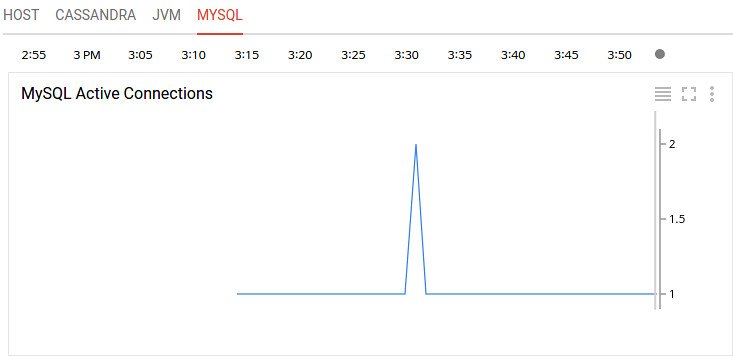
각 서버를 클릭해보자. stackdriver agent가 plugin이 정상으로 동작하여 정보를 제대로 가져온다면 Monitoring의 오른쪽 그래프 윗부분에서 다음과 같은 화면을 볼 수 있다.

stackdriver-2-image06

[ 출처: Flickr, gongjak1 ]

6.현재 모니터링 가능한 항목

  • Connections (count): The number of active connections to MySQL.
  • Select Queries (count): The number of select queries being run.
  • Insert Queries (count): The number of insert queries being run.
  • Update Queries (count): The number of update queries being run.
  • Slave replication lag

[Using GCP] Stackdriver Third-party Appication Monitoring (3.MongoDB)

글쓴이 : 윤성재 (공작명왕)
E-mail : <gongjak@gmail.com>
Facebook : < https://www.facebook.com/sungjae.yun >

MongoDB Plugin

1.MongoDB 설치와 시작

< Debian 8 >

sudo apt-get install mongodb

< CentOS 7 >

sudo yum install mongodb-server mongodb
sudo systemctl start mongod

2.사전 준비

모니터링을 위해 clusterMonitor Role를 가진 유저를 admin database에 생성해준다. db.auth 명령어에서 “1”이 나오면 정상으로 인증에 성공한 것이다.

< Debian 8 >

mongo
> use admin
> show users;
> db.addUser("stackuser","stack1234","clusterMonitor");
> db.auth("stackuser","stack1234");
1
> exit

< CentOS 7 >

mongo
> use admin
> show users;
> db.createUser( { user: "stackuser", pwd: "stack1234", roles: ["clusterMonitor"] } )
> db.auth("stackuser","stack1234");
1
> exit

3.Plugin 설치

cd /opt/stackdriver/collectd/etc/collectd.d/ && sudo curl -O https://raw.githubusercontent.com/Stackdriver/stackdriver-agent-service-configs/master/etc/collectd.d/mongodb.conf

mongodb.conf 파일을 열어 STATS_USER, STATS_PASS 의 주석처리(“#”)을 지워주고, 앞에서 생성한 유저의 ID와 Password로 바꿔준다.

4.Stackdriver Agent 재시작

< Debian 8 >

sudo service stackdriver-agent restart

< CentOS 7 >

sudo systemctl restart stackdriver-agent

5.Monitoring 확인

Monitoring -> Resources -> Instances

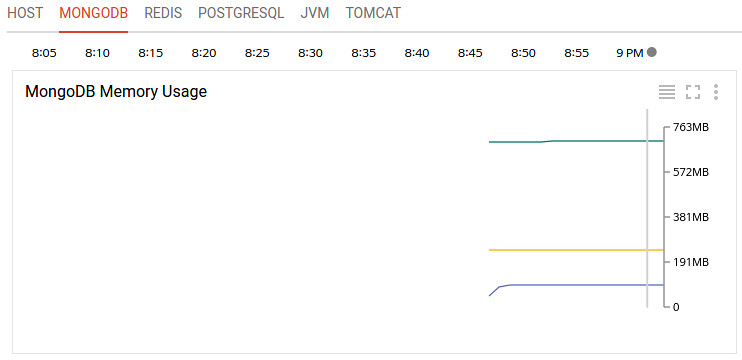
각 서버를 클릭해보자. stackdriver agent가 plugin이 정상으로 동작하여 정보를 제대로 가져온다면 Monitoring의 오른쪽 그래프 윗부분에서 다음과 같은 화면을 볼 수 있다.

stackdriver-2-image04

[ 출처: Flickr, gongjak1 ]

6.현재 모니터링 가능한 항목

  • Current Connections (count): The number of active connections to MongoDB.
  • Global Lock Hold Time (ms): How long the global lock has been held.
  • Mapped Memory (bytes): The amount of mapped memory used by MongoDB. This is roughly equivalent to the total size of your database, due to the use of memory mapped files.
  • Virtual Memory (bytes): The amount of virtual memory used by MongoDB. If the virtual memory size is significantly larger than mapped memory size (e.g. 3 or more times), this may indicate a memory leak.
  • Resident Memory (bytes): The amount of resident memory that is used by MongoDB. This is the amount of RAM being physically used by the database.
  • Operations [command, delete, getmore, insert, query, update] (count/s): The number of [command, delete, getmore, insert, query, update] operations executed per second.
  • Database [Collection, Index, Object, Extents] Count (count): The number of [collections, indices, objects, extents] currently in the database.
  • Database Data Size (bytes): The size of the data currently in the database.
  • Database Storage Size (bytes): The size of the storage currently allocated to the database.
  • Database Index Size (bytes): The size of the index for the database.